Files & media
Many parts of Admire let you attach files or embed images: in skills, playbooks, AI Coaches, Meetings, and the Attachments card on a person’s profile.
Uploading
Section titled “Uploading”Upload a file or drop an image directly into an editor. Uploads are handled securely and attached to the item you’re working on.
You can also attach files to a new Skill or Meeting before you save it. They upload straight away and are attached when you save the record, so the Save button waits for any upload still in progress.
Embedded images must be PNG, JPEG, GIF, WebP or SVG, up to 10 MB each. Anything else is turned down with a message explaining why — iPhone photos in Apple’s HEIC format are the common case, so convert those to JPEG first.
How access works
Section titled “How access works”A file you upload is private to you until it’s added to the item you’re working on, such as a skill or a playbook page. A file you add to a new Skill or Meeting stays private to you until you save that record. Once added, it’s visible to the people who can see that item, so a file’s audience follows the thing it belongs to. This keeps in-progress uploads private and shared content appropriately visible.
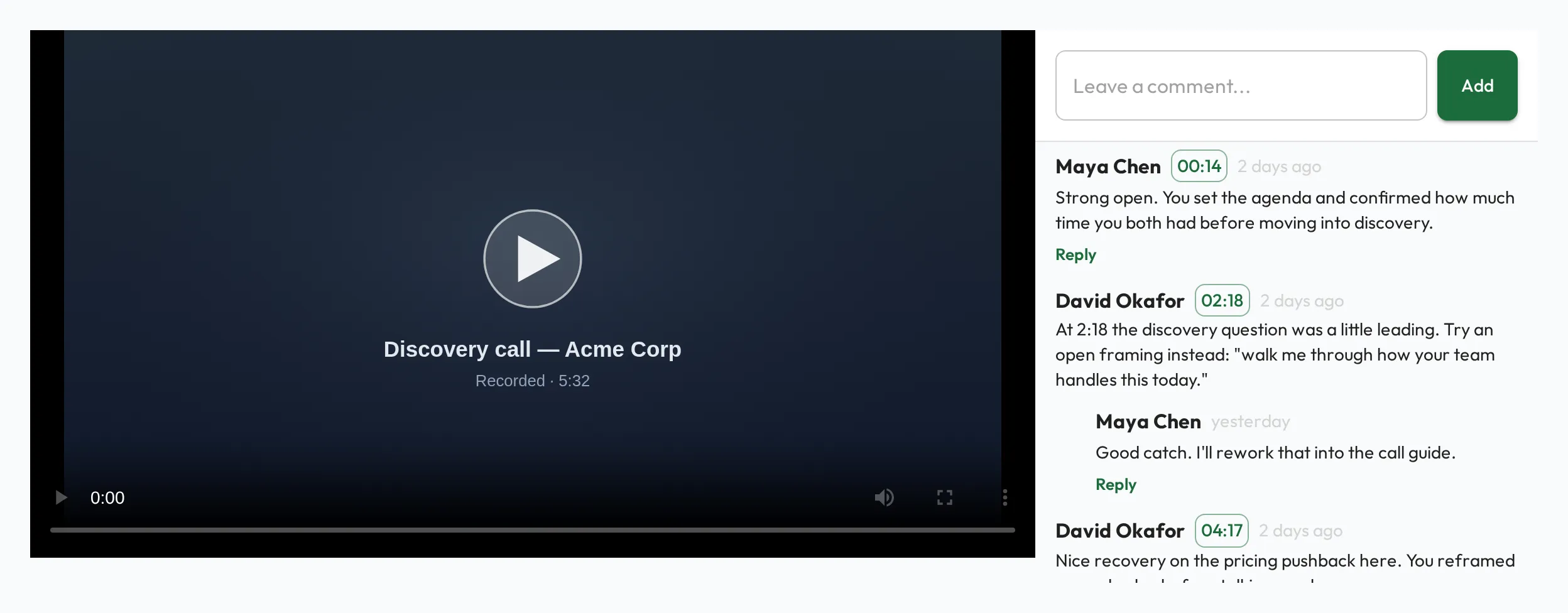
Commenting on videos by timestamp
Section titled “Commenting on videos by timestamp”Video is especially powerful for coaching: a recorded call, a demo, or a role-play. You can comment on a video at a specific timestamp, pinning feedback to the exact moment it refers to. Each comment links back to its point on the timeline, so a coach and the person being developed can discuss precise moments (“at 2:14, notice how that question was framed”) instead of describing them vaguely. It turns a video into a moment-by-moment coaching conversation.