

Planning a Meeting
A little planning makes a Meeting far more useful. Whoever sets it up, the coach or the person being coached, decides who’s involved, which skills to focus on, and what to cover.
Set it up
Section titled “Set it up”-
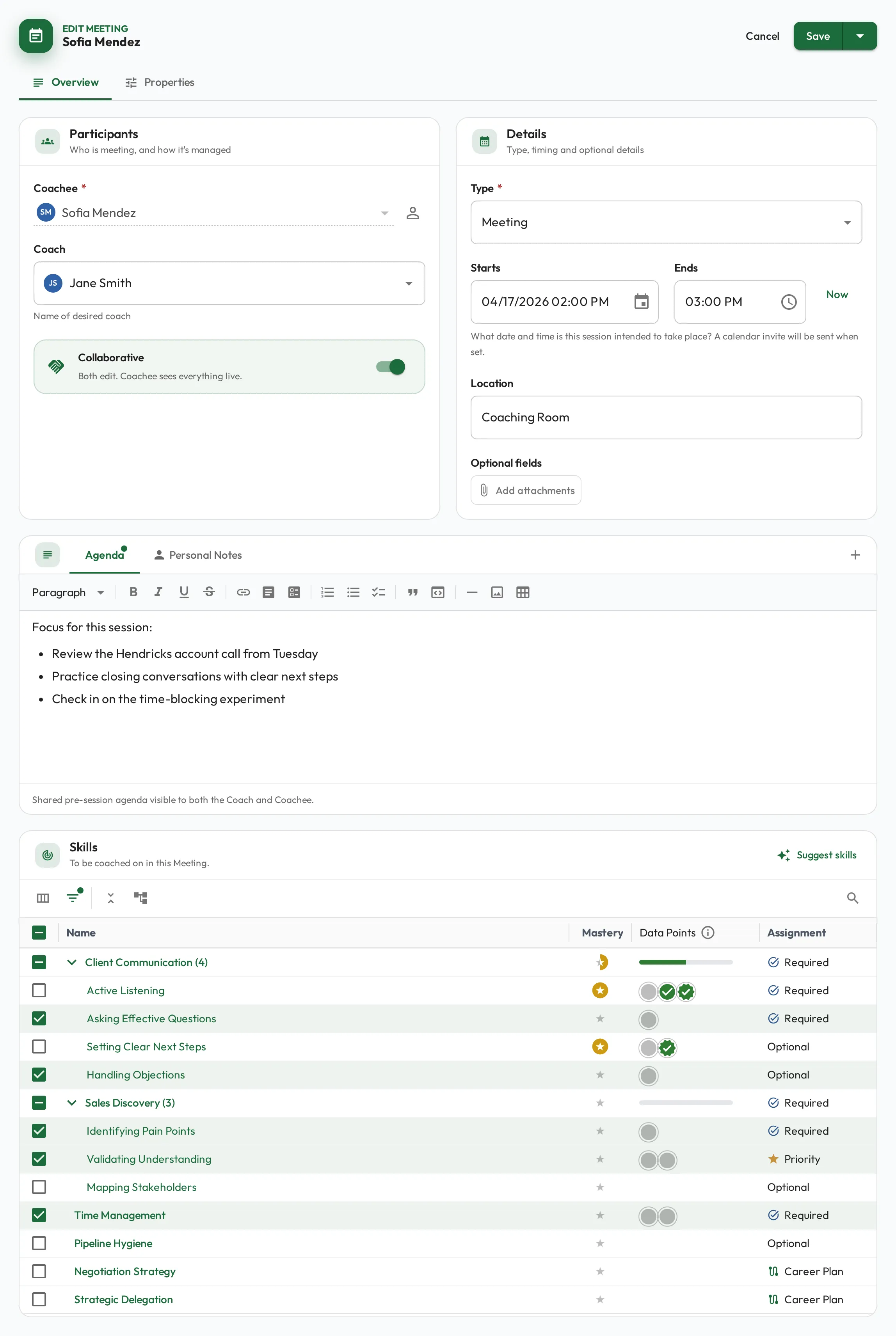
Choose the people: who is being coached, and who will coach or assess.
-
Select the skills to focus on, usually the ones most relevant right now. The list includes both the skills expected of their role and any assigned directly through their career plan, so growth skills beyond the role are there to choose too. The Assignment column labels how each skill got there: Priority, Required, Career Plan, or Optional. The person’s profile shows where they stand and what to focus on.
-
Write an agenda (optional) using agenda notes to outline what to cover.
Collaborative Meetings
Section titled “Collaborative Meetings”A new Meeting starts Collaborative, whoever sets it up: the coachee runs it with the coach and watches everything land live, the notes, the skills in focus, and each score as the coach records it. The switch is on the Participants card. Turn it off and the Meeting reads Restricted: it is the coach’s to run, and the coachee sees the results once the coach completes it.
The switch turns sharing on or off with it. Sharing (Share notes and data with Coachee) can change on its own, from Properties here or from Details while the Meeting is running. Once the Meeting exists, sharing is the coach’s call, not the coachee’s.
Collaborative means the Meeting is as much theirs as yours: they can read and edit your Coaching Notes, and delete it while it is still empty. Turn the switch off if either should stay yours alone, then turn sharing back on from Properties if you still want them watching.
| Setting | The coachee |
|---|---|
| Collaborative | Runs it and sees everything live. |
| Collaborative, sharing turned off | Runs the Meeting with you: the agenda and the skills in focus. Your Meeting Notes and the scores wait until you share them; Coaching Notes are open either way. Completing it stays yours. |
| Restricted | Sees the agenda. Notes, skills and scores arrive once you share them, or automatically when the coach completes the Meeting. |
| Restricted, but shared during the Meeting | Watches your notes, skills and scores land as you record them, but does not run the Meeting. |
Recording scores stays the assigned coach’s job in every case. The exception is a self-assessment, where the person is their own coach.
A collaborative Meeting also doesn’t have to be set up by the coach. The person being developed can request and prepare their own: choosing a coach to assess them, picking the skills they want feedback on, and writing the agenda. The coach then joins to assess, and can be their direct manager or another expert in the company, handy for a second opinion from whoever knows the skill best. It flips the initiative to the coachee: they line up the session when they’re ready.
Setting one up for themselves, the coachee sees You manage this Meeting on the Participants card rather than the switch. Sharing starts on for them too, and Properties is where they turn it off if they would rather not watch the assessment being written. That choice is theirs only until they create it.
This pairs naturally with relationships and the dashboard quick meetings shortcuts.
When you’re ready, run the Meeting.